Flow of Invoices between Supplier and Recipient
Documents (Invoices, Credit Notes, and Debit Notes) uploaded by a Supplier
in their FORM GST ANX-1 show up in FORM GST ANX-2 of respective recipients
in near real time. As mentioned in the article on All about
ITC, the Recipient may claim ITC on an Invoice of a
particular month that is uploaded before the 10th of the succeeding month.
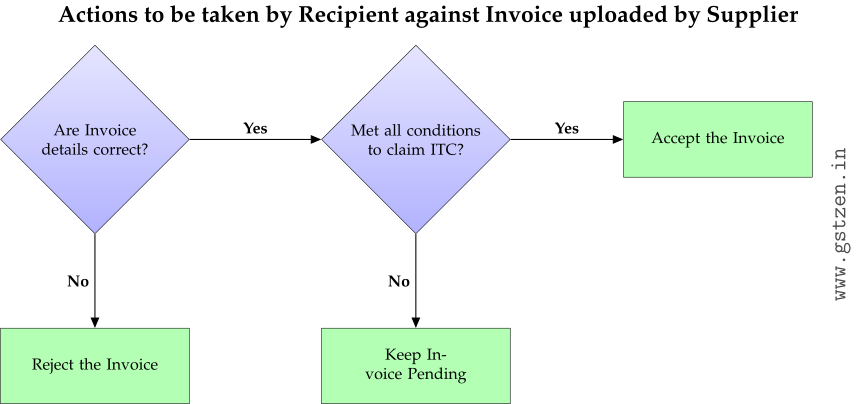
The Recipient can also Reject an erroneous document or keep it Pending and
claim ITC in a future month. The flowchart below describes the actions that
a Recipient may take against Invoices uploaded by the Supplier.
Only the Supplier can modify or edit details
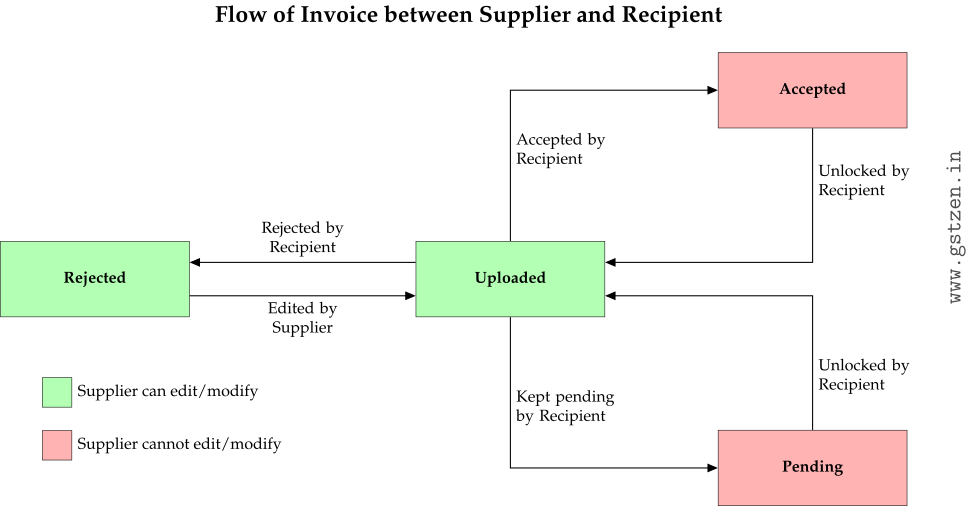
of an Invoice. The flow chart below shows state changes after various
actions by the recipient and when edits are allowed by the Supplier.
When a Supplier uploads an Invoice, it is in state Uploaded and immediately
visible to the Recipient. The Recipient can Accept the Invoice if they
have fulfilled all conditions for claiming ITC (see All about
ITC for more details). Once the Recipient accepts the
Invoice, the Invoice is locked for editing by the Supplier. In case the
Invoice is correct and the Recipient marks the Invoice as Pending for
claiming ITC at a future date, the Invoice is again locked for editing by
the Supplier. The Recipient can Unlock the Invoice to allow the Supplier to
edit it again. Rejected Invoices are editable by the Supplier and become
visible to the Recipient after they are corrected by the Supplier.